
Video guide
Prefer to watch? This short guide shows the fan-side tip modal on a feed post — the preset amounts and the custom field — what your share is, and where feed tips turn up in your earnings report.
Every public-feed post and unlocked subscriber-only post has a tip button. Fans can tip you 50, 100, 200, 500, 1,000 tokens or any custom amount in tokens — straight from the feed card without leaving the page. This guide explains the fan-side tip flow, the creator-side share, where tips show up in your earnings, and the rules.
1. There’s nothing to set up
Feed-post tipping is on by default for every post you publish. You don’t toggle it on, you don’t set a tip menu, you don’t pick a minimum. Every fan who can see the post sees a tip button under it. The only way to opt a single post out is to delete the post; there’s no per-post tip toggle.
That makes feed tipping different from livestream tipping (which is a richer flow with optional Lovense triggers and a per-show tip menu — see Pairing your Lovense toy for the streaming side).
2. What fans see — the tip modal
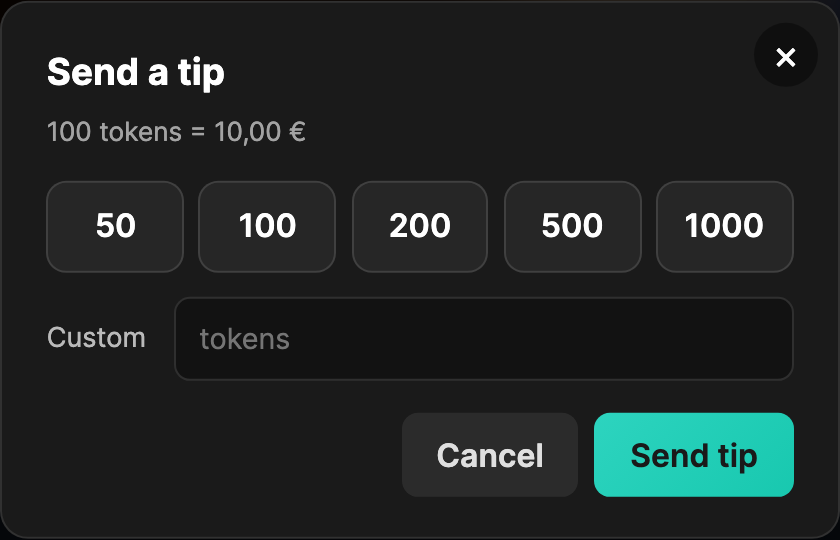
On every feed post card and on the full-post page, there’s a tip button under the post body alongside the like and comment buttons. When a logged-in fan clicks it, a modal opens with:
- A title: “Send a tip”.
- A hint just below: “100 tokens = 10,00 €”. (The conversion is fixed — 1 token = 10 cents EUR.)
- Five preset tier buttons: 50, 100, 200, 500, 1000 tokens. Click one to select it; click another to switch.
- A Custom field with a “tokens” placeholder. Type any whole number ≥ 1 to override the preset.
- Two action buttons at the bottom: Cancel and Send tip.
Click Send tip: the modal stays open while the request goes through. On success the modal closes and the fan’s wallet is debited immediately. On error, an inline error appears in the modal under the buttons.
3. Who can tip
Three rules govern who can tip:
- Must be logged in. Logged-out visitors get a “Sign in to tip” button in place of the tip button; it sends them to /my-account/ and back to the post. The exact server error if a request slips through anonymously: “Sign in to tip.”
- Cannot tip your own post. If you’re somehow logged in as the creator and click your own tip button, the server rejects it: “You cannot tip your own post.”
- Must have wallet balance. Tips are paid from the fan’s GuyScat wallet, not from a card directly. If the wallet is short, the server returns “Not enough wallet balance. Top up to continue.” The fan can hit Topping up your wallet to add funds and try again.
There’s no follow-required gate, no subscriber-required gate. Any logged-in fan with sufficient wallet balance can tip any post they can see. Subscribers tipping a subscriber-only post they’ve unlocked works the same as anyone tipping a public post.
4. Your share — what you actually receive
The platform commission on feed-post tips is the standard 50%. You receive 50% of every tip as your earnings share. So:
- A 50-token tip = €5.00 from the fan → €2.50 to your earnings.
- A 100-token tip = €10.00 from the fan → €5.00 to your earnings.
- A 500-token tip = €50.00 from the fan → €25.00 to your earnings.
- A 1,000-token tip = €100.00 from the fan → €50.00 to your earnings.
The split applies the moment the tip is processed. The fan’s wallet is debited; your earnings ledger gets a credit entry. There’s no delay, no batching — the tip lands in your monthly payout pipeline the same day.
If something goes wrong on our end (rare), the fan’s wallet is automatically refunded and your credit is rolled back — we use a reversal entry rather than leaving partial state. The user-facing error if the tip system is temporarily unavailable: “Tips are not available right now.”
5. Where tips show up in your earnings
Each tip is a separate ledger entry, tagged with its source so you can see what came from where:
- Source
gc_feed_tip. That’s the tag every feed-post tip carries into your earnings and your payout export. (The matching debit on the fan’s wallet ledger is taggedgc_feed_post_tip— same tip, two different ledgers.) Live-stream tips carry a different source tag; clip purchases carry another; subscriptions another. - Your earnings report. On /store-manager/reports-earnings/, feed tips get their own bucket — Feed tips — so you can separate them from clip, subscription and livestream income and total them over any date range. Each tip is its own row, labelled with the title of the post it was tipped on.
- The fan’s view. Nothing is added to the post itself — there is no public tip counter on a feed post and no public list of who tipped. The fan’s own record is the debit line in their wallet history; yours is the earnings row above.
For monthly aggregates, see your payout history article: Reading your Payouts page.
6. What fans expect when they tip
Tips are non-refundable from the fan’s side — once sent, they stay. Worth being mindful that:
- Tips are private. A feed tip isn’t announced anywhere — other fans browsing the post can’t see who tipped or how much, and there is no public tip counter on the post. Only you see it, in your earnings report.
- Tips don’t unlock anything. A tip is a thank-you, not a paywall bypass. A subscriber-only post stays subscriber-only even after a non-subscriber tips it. To unlock a subscriber-only post, the fan still needs to subscribe.
- The fan sees a confirmation. The modal simply closes. There’s no follow-up email or notification on the fan’s side beyond the wallet entry — the wallet history at /my-account/wallet/ shows the debit.
For your side: the tip notification (if you’ve enabled push or email for tip events) lands within seconds. Most creators leave tip notifications on for live streams (they help you call out the tipper in real time) and on or off for feed tips depending on volume.
7. Patterns that earn more tips
Tips are voluntary, but creators with engaged fans see meaningful tip income alongside subscription and clip revenue. A few patterns:
- Ask occasionally, not constantly. A “tip jar’s open if you liked this” footer on every fifth or sixth post performs better than asking on every post.
- Write specific posts that invite tipping. Long, vulnerable, behind-the-scenes posts get tipped more than clip-promo posts. Tips correlate with how personal the post feels.
- Acknowledge tippers. Because feed tips aren’t public, the thank-you has to come from you — a line in the post comments, or a DM to the fans your earnings report lists as your biggest spenders. Repeat tipping follows acknowledgement.
- Don’t over-discount your subs to over-rely on tips. A €4.99 sub + occasional tips is better than a €0.99 sub trying to back into the same revenue from tips alone. Tips are unpredictable; subs aren’t.
8. FAQ
Q: Can I disable tipping on a specific post?
No. Tipping is on for every published post. The only way to stop tips on a post is to delete it.
Q: Can I set a custom tip menu / tip preset values?
Not for feed posts. The five tier buttons (50 / 100 / 200 / 500 / 1000) and the custom field are platform-wide. The customisable tip menu only exists in the live-stream tipping flow — see Setting up your tip menu when shipped.
Q: What’s the minimum tip?
1 token (€0.10). Below that the server rejects it: “Tip amount must be at least 1 token.”
Q: What’s the maximum tip?
There’s no hard maximum on a feed-post tip beyond the fan’s wallet balance. Realistically, very large tips (5,000+ tokens) are rare on feed posts and far more common in livestream tipping.
Q: Can a fan tip me from a comment thread on the post?
The tip button is on the post itself (under the body, alongside like / comment / open). Comments don’t have their own tip buttons. The closest workflow is a fan replying to a comment + tipping the post.
Q: Do tips count towards my monthly minimum payout threshold?
Yes. Feed-post tips are part of your gross earnings same as clip sales, subscriptions, and livestream tips. They roll into your monthly payout export at the standard 50%.
Q: A fan messaged me saying their tip went through but didn’t appear. What now?
Check the Feed tips bucket on /store-manager/reports-earnings/ first — a tip shows up there within seconds. If the fan’s wallet was charged but no entry shows up, open a ticket from Contacting support under Feed with the post ID, fan’s display name, approximate time, and the tip amount they reported. We can trace the wallet ledger and reconcile.
Q: What if the fan tipped after the post was already deleted?
The tip cancels. The fan’s wallet is automatically refunded; nothing is owed to you on a deleted post.
Need more help
For tip-flow questions or anything that looks broken, open a ticket from Contacting support under Feed (creator). Include the post ID and the fan’s display name where relevant.