
If you stream from your phone, your toy can still react to tips — no browser extension needed. Your viewer taps a tip, our server sends the command to Lovense, and Lovense passes it to the Lovense Remote app on your phone, which drives the toy. This guide covers that path. Everything below was measured on a real phone, not copied from documentation.
Is this guide for you?
| Browser path | Phone path (this guide) | |
|---|---|---|
| You stream from | a computer | your phone |
| You need | the Lovense Cam Extension in your browser | the Lovense Remote app |
| Enabled for you? | always | we switch it on for your account |
If you stream from a computer, this guide is not for you — everything runs through the browser extension there. See Pairing your Lovense toy.
1. The step almost everyone forgets
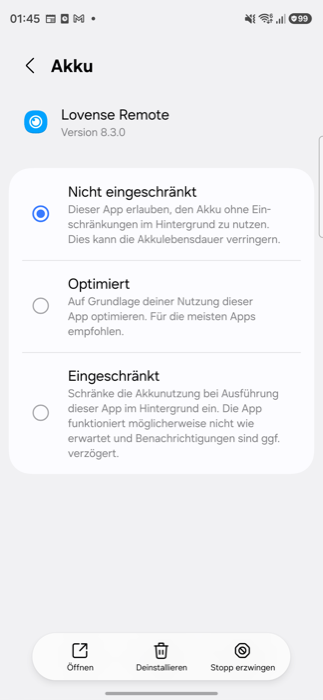
Set battery optimisation for Lovense Remote to “Unrestricted”. Without this, the phone path does not work in practice.
The reason is Android, not Lovense. The moment you bring your browser to the front — which is exactly what you do to stream — Android pushes the Lovense app into the background and cuts its connection there. From our side your phone then looks offline: the tip arrives, your toy does nothing.
Settings → Apps → Lovense Remote
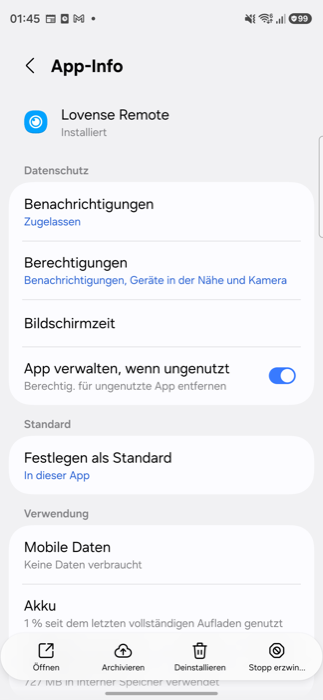
Then tap Battery and choose Unrestricted:
Why we are confident this is the cause
We measured it with one variable — same phone, same app, same pairing:
| State | Toy reachable? |
|---|---|
| App in the foreground | yes |
| App in the background, without the setting | no, after roughly 45 seconds |
| App in the background, with the setting | yes, continuously |
| Setting removed again | no again, within roughly 45 seconds |
And over a longer run in the real streaming situation — browser in front, app in the background, 20 commands each:
| Commands delivered | Failures | |
|---|---|---|
| With “Unrestricted” | 20 of 20 | 0 |
| Without | 19 of 20 | 1 |
What those numbers honestly do not say: the one failure was gone by itself 24 seconds later. How often it hits you depends on how long your phone has left the app alone — Android throttles an app harder the longer you have not used it. In our measurement the app had been in the foreground shortly before, which is why failures were rare. During a long stream where you do not touch the phone, expect more.
So the recommendation is clear even though the number looks small: change the setting. It costs you ten seconds and removes the cause instead of relying on luck.
Do not confuse the two apps: this setting is for Lovense Remote. The other app from the same company, Lovense Connect, often has it already — but that is not the one we use here.
2. Create the link
In your Studio under Livestream you will find the card “Toy via the Lovense app”. Tap Create link — you get a QR code and a numeric code.
Then in the app:
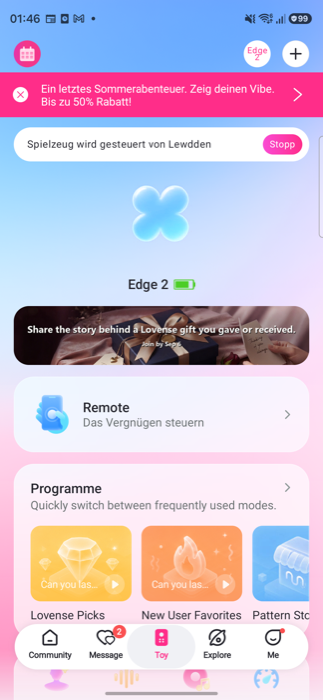
a) Open Lovense Remote and tap the “+” at the top right
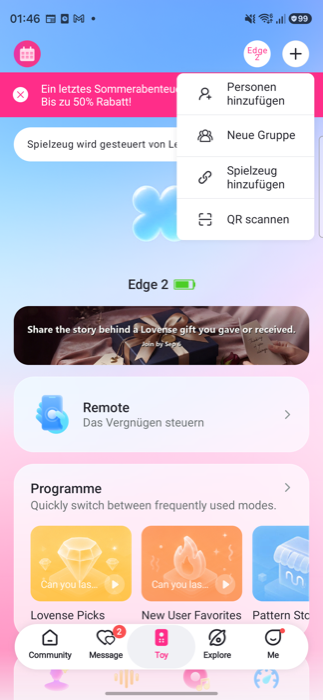
b) Choose “Scan QR”
c) Either scan the QR code — or tap “Input QR code number” at the bottom
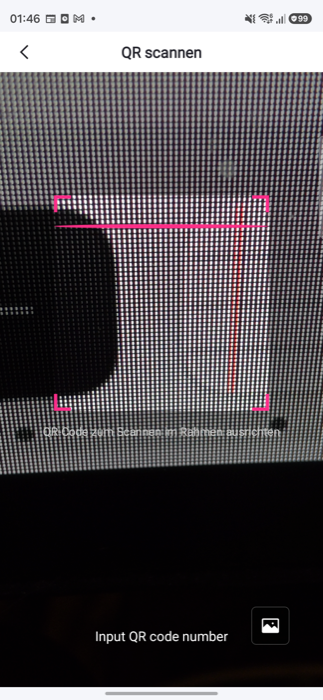
d) Type the numeric code and confirm with “Ok”
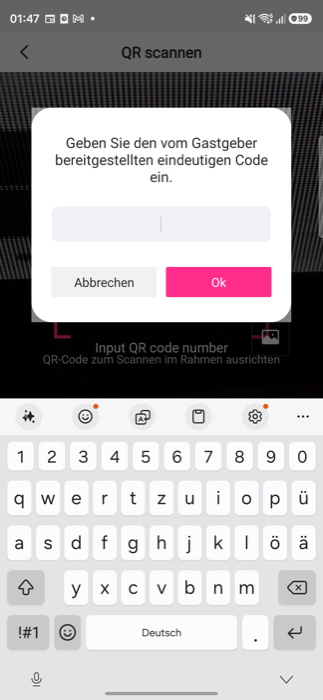
Enter the code immediately
A code about five hours old was silently discarded in our test: no error message, the scanner simply stayed open, and the connection never happened. A fresh code worked on the first try. No error message is not success. Create the code and use it within the same minute.
What success looks like
The scanner closes by itself, and the app’s home screen shows “Toy is controlled by <your site>” — see image (a) above.
3. Only ONE of our sites at a time
The app keeps exactly one link. If you pair a second one of our sites, the first one loses its link — with no message and no visible change in the app.
Measured with one toy and two sites:
| Site A | Site B | |
|---|---|---|
| before pairing B | reachable | not reachable |
| after pairing B | no longer reachable | reachable |
If you stream on more than one of our sites: pair again before each stream, for the site you are about to go live on. It takes twenty seconds and saves you a stream where nothing vibrates.
4. If the toy does not react
In order, most common cause first:
- Is battery optimisation set to “Unrestricted”? See step 1. By far the most common reason — a throttled app looks perfectly healthy in every display.
- Did you last pair a different one of our sites? See step 3. Then pair again.
- Is the app still open? A closed app is offline.
- Is the toy connected and charged? Visible in the app.
- Pair again. Create the code, enter it straight away.
- A test tip is the only reliable proof.
The card in your Studio shows you the state and re-checks it every minute while you stream. If it says “not connected”, it names the two most common reasons right there.
What we do not promise
- That the display inside the Lovense app is reliable. It demonstrably is not — the line “Toy is controlled by …” stays up even when the connection has long been dead.
- That a pairing code stays valid longer than a few minutes.
- That you can stay paired with several of our sites at the same time. That is not possible.
Common questions
Does this replace the browser extension?
No. Both paths work. The browser extension stays the normal way when you stream from a computer, and nothing about it changes.
A tip arrived but the toy stayed quiet — do I lose the tokens?
The viewer’s tokens are booked when the tip is sent, before the command reaches your toy. If the command fails, our server retries once automatically. If that also fails, it is recorded and we can see it.
Can I test it without a viewer?
Yes — use Check link on the card in your Studio. That asks Lovense whether your phone is reachable right now, without moving your toy.